AUDES
User Manual · 2025 Edition

TT-3200DC

Power Conditioner

Thank you for purchasing this Audes product. To use it safely, please read and follow the instructions in this manual at all times.

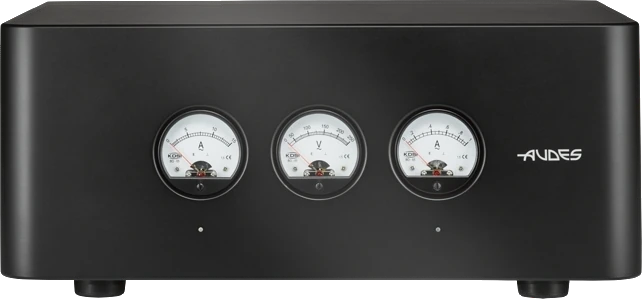
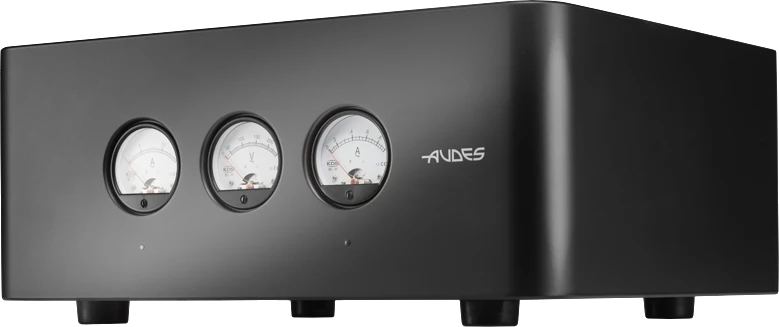
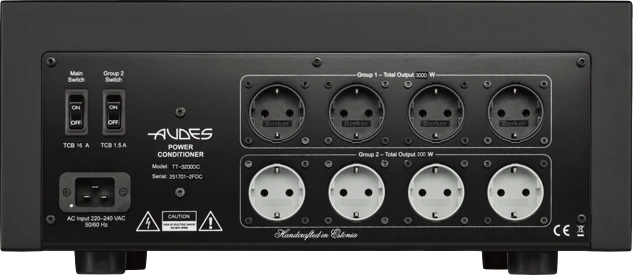
TT-3200DC front panel TT-3200DC three-quarter view TT-3200DC rear panel
3200V∙A total
4 + 4Isolated outlets
220–240VAC · 50/60 Hz
37 kg82 lbs
Before Using This Product

Safety first.

To use the TT-3200DC safely, please read and follow the instructions below at all times.

Warning

The instructions in this section refer to risks that can lead to serious injury or death.

01

Do not disassemble

The unit contains no user-serviceable parts. Removing any panel exposes uninsulated dangerous voltage, which can cause electric shock and serious injury. If the unit malfunctions, contact your authorised dealer or the manufacturer for service.

02

Handle and place with care

Check the unit's weight (37 kg) before handling it, and take precautions so it cannot fall: a drop can cause permanent damage and injury. Place it on a firm surface; on a shelf, make sure the shelf can carry the load. Rubber feet keep it from sliding.

03

Correct mains voltage

Make sure your mains voltage matches the one shown on the rear panel next to the AC inlet. A different voltage can permanently damage the unit and cause fire. Do not use plug adapters, do not change the outlet sockets, and use fuses only of the rating shown next to the AC inlet.

04

Protect every power cord

Do not bend cords excessively or place them near sources of heat, and never use a cord that is damaged: it can cause electric shock or fire. This applies to the cord that feeds the conditioner and to every cord feeding connected equipment.

05

Keep it dry

Do not place containers of liquid on the unit or expose it to rain or excessive humidity. Clean only with a dry cloth, and never handle the unit or insert plugs with wet hands. After rapid heating or cooling, such as during transport, wait several hours before switching on so any condensation can dry completely.

06

Disconnect when idle or in storms

Disconnect the unit from the mains if it will not be used for a long period, and during a thunderstorm or lightning.

Compliance. Audes LLC OÜ declares that this equipment was manufactured in compliance with Directive 2014/30/EU.

Disposal. This unit is electrical equipment and must not be put in general waste. Follow your local guidelines for the disposal and recycling of electrical equipment.

Part Names

Know your conditioner.

Select a number on the photo, or a name in the list, to see what each part does.

Front panel

TT-3200DC front panel
  1. 01
    Main Ammeter

    Indicates the current flowing through the power conditioner.

  2. 02
    Voltmeter

    Indicates the voltage supplied to the power conditioner.

  3. 03
    Group 2 Ammeter

    Indicates the current flowing through the Group 2 transformer.

  4. 04
    Main Power LED Indicator

    Lights up once the power conditioner is switched on.

  5. 05
    Group 2 Power LED Indicator

    Lights up once the Group 2 transformer is switched on.

Rear panel

TT-3200DC rear panel
  1. 01
    Main Switch

    Turns the unit on and off.

  2. 02
    Group 2 Switch

    Turns the Group 2 transformer on and off.

  3. 03
    Group 1 Outlets

    Connect the power cord of a piece of equipment here to supply it from the main transformer.

  4. 04
    AC Inlet

    The inlet for the supplied power cord.

  5. 05
    Model and Serial

    Shows the model name and the serial number of the unit.

  6. 06
    Group 2 Outlets

    Connect the power cord of a piece of equipment here to supply it from the Group 2 transformer.

Product Description

How the TT-3200DC works.

The TT-3200DC supplies electrical power to high-end and Hi-Fi AV equipment. Its main elements are two toroidal transformers designed and developed by Audes, which isolate your equipment from the domestic network.

Main Transformer · Group 1

3000 V∙A 230 VAC / 115 + 115 VAC, with balancing capability

Feeds the four Group 1 outlets. Output voltages are symmetrical with respect to an artificial centre tap connected to the PE (earth) contact of each socket.

Group 2 Transformer

200 V∙A 230 VAC / 230 VAC

Feeds the four Group 2 outlets, intended for low-power devices with switched-mode power supplies (SMPS). SMPS can introduce distortion that adversely affects analogue devices on the same source; devices on Group 1 are isolated from devices on Group 2.

01

Mains noise filtering

The toroidal transformers are designed to filter noise from the mains using controlled leakage inductance and capacitance. All outlet sockets are fully isolated from the mains.

02

Integrated DC blocker

Protects the unit from direct current present in the mains, significantly reducing transformer hum caused by DC offset for quieter operation.

03

Soft start

At switch-on, the main transformer draws a high inrush current while its core magnetises. A special ballast resistor limits this surge, so other equipment on the same electrical network remains unaffected.

04

Thermal protection

The unit is protected by a thermal circuit breaker. In addition, each transformer switches off if it reaches 90 °C and reconnects automatically once it has cooled to 75 °C.

Installation and Setup

Six steps to clean power.

1

Position the power conditioner

The design minimises electromagnetic radiation despite the high power rating, but do not place the unit close to turntables or phono stages to avoid potential interference. Place it on a stable, flat surface that gives proper support and airflow.

2

Check the mains voltage

Before connecting, verify that your mains voltage matches the voltage required by the unit, shown on the label on the back of the conditioner next to the AC inlet.

3

Connect the power cord

Connect the supplied power cord to the AC inlet on the back of the unit. The live wire (L) in the AC inlet is marked by a small white dot in the corner of the inlet.

4

Power on

Make sure the unit is switched off before inserting the plug into the wall outlet, then press the Main Switch. The front-panel LED indicators light up and the voltmeter shows the mains voltage. Use the Group 2 Switch on the back panel to turn the Group 2 transformer on or off.

Note: the Group 2 outlets will not work unless the power conditioner has first been turned on with the Main Switch.

5

Connect your equipment

You do not need to switch the unit off to connect AV equipment. Connect all devices with switched-mode power supplies (SMPS) to the Group 2 outlets; this is strongly recommended. If your system has no SMPS devices, the Group 2 outlets can safely power other equipment, provided the total load does not exceed 200 W.

6

Socket orientation

Because the output sockets are galvanically isolated from the neutral wire, plugs can be inserted in either orientation. For consistency, we recommend keeping the same orientation for all connected devices.

Troubleshooting

If something isn't right.

Check these points first. If the problem persists, contact your authorised dealer or Audes.

T01The power conditioner does not turn on
  1. Check that the mains voltage is suitable for the power conditioner. The required voltage is shown on the back of the unit next to the AC inlet.
  2. Check that the power cord is securely connected both to the AC inlet and to the wall socket.
T02A connected piece of equipment does not turn on
  1. Check that the power conditioner is switched on. For Group 2 outlets, also check that the Group 2 Switch is on.
  2. Check that the equipment's power cord is securely connected to the conditioner's outlet.
T03The circuit breaker trips persistently
  1. Check that the mains voltage is suitable for the power conditioner. The required voltage is shown on the back of the unit next to the AC inlet.
  2. Check that the total connected load does not exceed the stated power rating of the unit.
T04The power conditioner keeps switching off
  1. Check that the total connected load does not exceed the stated power rating of the unit.
  2. If the ambient temperature is high, for example because the unit sits in a very confined space, the thermal protection switches it off automatically to prevent the transformer from overheating. Move the conditioner to a well-ventilated space or provide external cooling.
Technical Specifications

TT-3200DC in detail.

ModelTT-3200DC
Power rating, total3200 V∙A
Power rating, Group 13000 V∙A
Power rating, Group 2200 V∙A
AC input220–240 VAC, 50/60 Hz
Max AC output, Group 113.6 A
Max AC output, Group 20.9 A
Inlet16 A IEC C20
Outlets, Group 14 × 16 A / 250 VAC CEE 7/3
Outlets, Group 24 × 16 A / 250 VAC CEE 7/3
Power supply cable16 A / 250 VAC IEC C19
Dimensions (mm)209 H × 477 W × 372 D
Dimensions (in)8¼″ H × 18¾″ W × 14⅝″ D
Weight37 kg / 82 lbs

Audes reserves the right to change technical specifications without notice.

Warranty

Two years of cover.

The TT-3200DC comes with a two-year warranty against defects in parts and assembly, from the moment of purchase. Keep your receipt or invoice as proof of purchase.

01

What is covered

Product issues caused strictly by defects in parts and assembly. The warranty does not cover issues caused by misuse, unauthorised modifications, tampering or acts of God.

02

Repair or replacement

Audes LLC OÜ chooses whether to replace defective parts with new or refurbished parts, or to replace the complete product with a new or refurbished one. Parts or products replaced under warranty become the property of Audes.

03

Shipping and packaging

The owner is responsible for the product's safety in transit and for all transport costs to and from inspection and repair. Ship it in the original packaging or equivalent protection; Audes is not liable for transit damage. Audes may deem packaging inadequate even if the product arrives undamaged, and will then replace it with original packaging at the owner's cost. Keep the original packaging for at least the warranty period.

Designed & manufactured
100% in the European Union
Reliability. Safety.
Performance.